Search topics
Video transcripts that leave out what is shown
A brewing video's transcript is its captions file as text, so the amounts it shows only as cards on screen never reach anyone who reads it instead.
<p>Weigh it out like this.</p> The problem
People who can neither see nor hear the video read its transcript and never learn the amounts
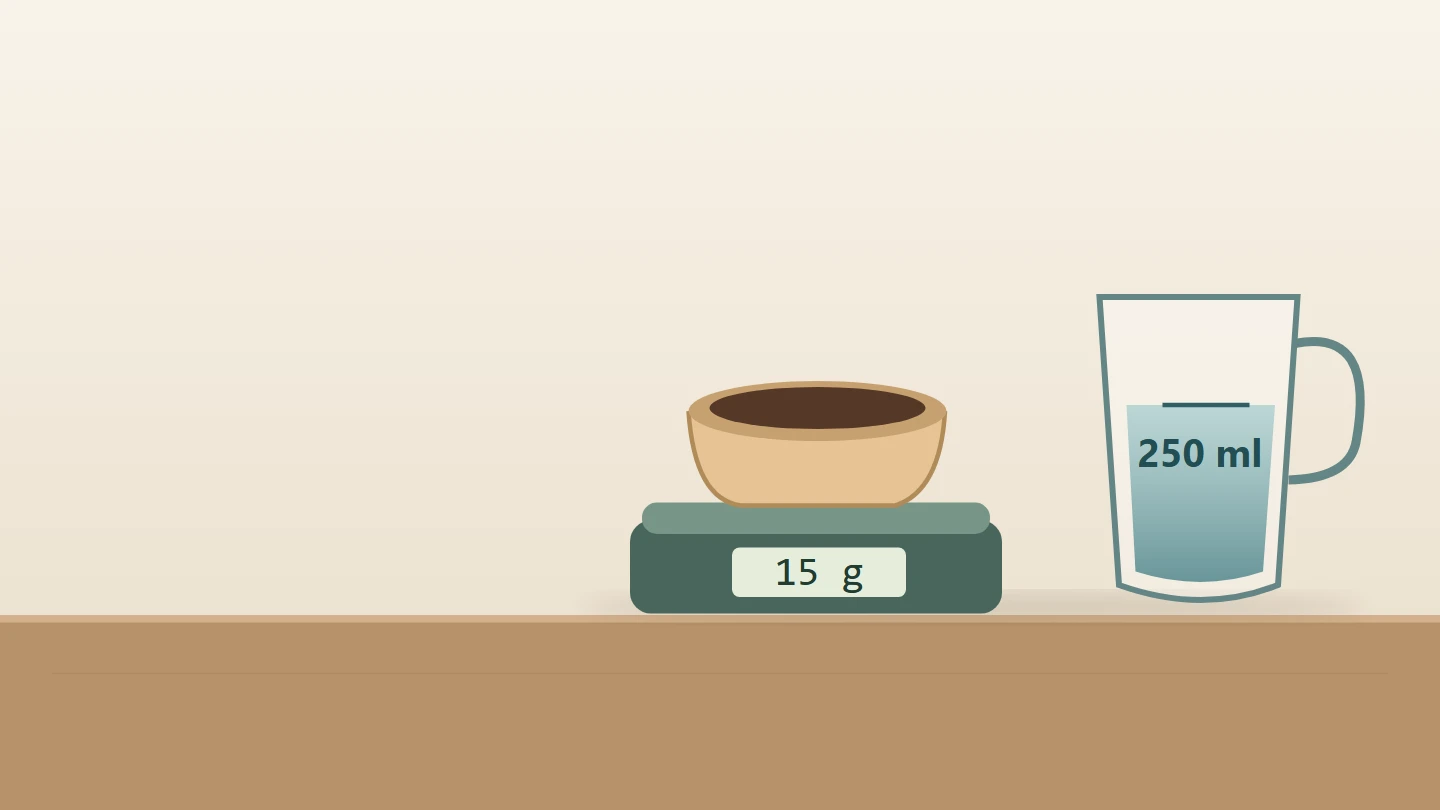
The coffee roaster's brewing video already does what WCAG asks at Level AA. It has captions, and an Audio description button beside the player swaps in a described version, as in videos without audio description of what they show. Under the player sits a Transcript, in a closed details. The shop made it the quick way, from the captions file, one paragraph a caption: "Here's how to brew our house blend. Weigh it out like this. Then let the water rest. Pour slowly, and stop here. [Kitchen timer rings]". The amounts are in the picture. A card says 15 g coffee and 250 ml water while a scale's reading climbs, another says cool 30 s after boiling while a timer runs down, and the last says pour in 3 stages and stop at 3:00. A deafblind visitor reading the page on a braille display can't watch the picture or hear either soundtrack, so they open the transcript, the one version that reaches them. It tells them to weigh it out "like this".
Success criterion 1.2.8, at Level AAA, asks for an alternative for time-based media for every prerecorded video with sound. That is a document that gives, in order, what the video says and what it shows: the dialogue, the sounds that matter, the setting, the actions, and any text on screen (technique G69). Captions carry only what is heard, so a transcript made from them is a transcript of the soundtrack. W3C calls that a basic transcript, and says the descriptive kind, which adds the visual information, is required to provide video content to people who are both Deaf and blind. Nothing in the browser compares a transcript with its video. Here the captions pass 1.2.2 and the described version passes 1.2.5, so the video meets the Level AA media criteria and still fails this one.
WCAG leaves one kind of video out: a media alternative for text, a video that presents nothing more than text already on the page, clearly labelled as such. Failure F74 is leaving the label off. Using that exception, with the label, is the second fix below.
A transcript is also what people search, skim, translate and come back to. Anyone who searches the page for "grams", or reads the recipe again the next morning instead of replaying the video, meets the same gap.
3 of 10 groups affected
- No vision (affected)
- Low vision (affected)
- Colour vision (not affected)
- No hearing (affected)
- Hard of hearing (not affected)
- No speech (not affected)
- Motor (not affected)
- Reach, strength (not affected)
- Cognitive (not affected)
- Seizures (not affected)
- Without vision Deafblind visitors read the page on a braille display. The picture, the narration and the described version are all out of reach, so the transcript is the only version left, and it says "weigh it out like this" with no amount.
- Without hearing Deaf visitors who also have little sight can't read the captions and the cards in time, and turn to the transcript to read at their own size and pace. It has the narration's words and none of the amounts.
- Limited vision Someone who sees too little to read the captions and the small cards, and hears too little to follow the described version, reads the transcript enlarged. It never says how much coffee or how long to wait.
axe's video-caption rule looks for a captions track inside the <video>, finds one and passes it. No rule compares a transcript with the picture. EaseWeb's audit raises a review lead for every video. When it finds a possible transcript nearby, the lead says the transcript meets 1.2.3 at Level A only if it includes what the video shows; it says nothing about 1.2.8. Only someone who has watched the video can say what the picture adds. AI can draft a descriptive transcript, with speech recognition for the words and a vision model for the frames. But a draft such as "coffee is weighed on a scale" sounds right and leaves out the 15 g it reaches, so someone who knows the recipe has to check it against the video.
Try it
Turn the sound and picture off, then find out how much coffee to weigh
The switch stands in for a visitor who can neither see nor hear the video: the player and its Audio description button still work, and only the text reaches you. Open the transcript.
Apply a fix to read a transcript with what the video shows, or the steps written on the page with the video labelled as showing them.
Broken Can you fix this?
How to brew our house blend
Transcript
Here’s how to brew our house blend.
Weigh it out like this.
Then let the water rest.
Pour slowly, and stop here.
[Kitchen timer rings]
The fix
Give the whole video as text, what is said and shown
<h2>How to brew our house blend</h2><video id="brew-video" controls preload="metadata" src="brew-guide.webm" poster="brew-guide.jpg" data-described="brew-guide.described.webm"> <track kind="captions" srclang="en" label="English" src="brew-guide.en.vtt" data-described="brew-guide.described.en.vtt"></video><button type="button" id="describe" aria-pressed="false"> Audio description</button><details> <summary>Transcript</summary> <p>Here’s how to brew our house blend.</p> <p>Weigh it out like this.</p> <p>Then let the water rest.</p> <p>Pour slowly, and stop here.</p> <p>[Kitchen timer rings]</p></details><!-- Swaps in the described version and keeps the place, as in the audio description guide. --><script src="audio-description.js"></script>What is wrong3 points
- The transcript is the captions file as paragraphs: every line said, and nothing of what is shown.
- The 15 g, the 250 ml, the 30 seconds and the three pours are only in the picture.
- Someone who can only read the text learns to weigh it out "like this" and to stop "here".
A descriptive transcript beside the player
<h2>How to brew our house blend</h2><video id="brew-video" controls preload="metadata" src="brew-guide.webm" poster="brew-guide.jpg" data-described="brew-guide.described.webm"> <track kind="captions" srclang="en" label="English" src="brew-guide.en.vtt" data-described="brew-guide.described.en.vtt"></video><button type="button" id="describe" aria-pressed="false"> Audio description</button><details> <summary>Transcript, with what the video shows</summary> <p><b>Shown:</b> A kettle and a cup on a kitchen counter. A card says “How to brew”.</p> <p><b>Narrator:</b> Here’s how to brew our house blend.</p> <p><b>Narrator:</b> Weigh it out like this.</p> <p><b>Shown:</b> A spoon tips coffee into a bowl on a scale until it reads 15 g, beside a jug filled to 250 ml. A card says “15 g coffee, 250 ml water”.</p> <p><b>Narrator:</b> Then let the water rest.</p> <p><b>Shown:</b> Steam rises from the kettle while a timer counts down from 30 seconds. A card says “Cool 30 s after boiling”.</p> <p><b>Narrator:</b> Pour slowly, and stop here.</p> <p><b>Shown:</b> The kettle pours into a dripper on the cup in three separate pours, while a timer counts up to 3:00. A card says “Pour in 3 stages, stop at 3:00”.</p> <p>[Kitchen timer rings]</p></details><!-- Swaps in the described version and keeps the place, as in the audio description guide. --><script src="audio-description.js"></script>How it is fixed4 steps
- Rename the summary to say what the transcript holds: "Transcript, with what the video shows".
- Keep every line said, in order, and name who says it.
- Wherever the picture shows something, write it in at that point, labelled "Shown:": the action, and the words on the card. The amounts and times are now in the text.
- Keep the sound that matters, the timer, in square brackets.
This fixes the Before and passes 1.2.8 (technique G69). It is ordinary text right under the player, so a braille display reads it, find in page turns up "15 g", and it can be edited in the same change as the video. The captions and the described version stay, for people who watch or listen.
Why this fix: Keep the text alternative beside what it stands for
Both pass 1.2.8 when the text is complete. Use the descriptive transcript: it works whatever the video adds, while the labelled steps pass only as long as the video never says or shows more than they do. The steps suit a recipe or how-to page whose text is the main content anyway and whose video is an extra. They also help every reader, because the amounts are on the page before anyone presses Play. Choose them when the video is cut from the written steps and is edited along with them.
Start from the captions file, as W3C suggests, then watch the video with the sound off and write in what is shown. Describe what someone needs to follow it: words and numbers on screen, actions, who appears, and changes of place. Use the present tense, and leave out what the narration already says. Where there is a described version, its describer's script is a head start: the descriptions for the pauses are already written, and the transcript can say more, since it has no pauses to fit.
Mark what is shown apart from what is said with a word a braille display reads, such as "Shown:", not with italics or colour alone. Keep square brackets for sounds, so a reader knows which is which.
Where the video plays changes where the transcript comes from.
- Your own
<video>: put the descriptive transcript under it, as above, in adetailsif it is long. - A player that builds an interactive transcript, highlighting each line as it plays: Able Player builds one from the captions file and a descriptions file together, so a
<track kind="descriptions">puts the visual information in it. Players that build theirs from the captions only, such as YouTube's transcript panel, show the caption text and nothing of the picture. - An embedded YouTube, Vimeo or Wistia player: add your own descriptive transcript on the page under the embed.
If the video asks the viewer to do something, such as pressing a button when a prompt appears or choosing what to watch next, the text version needs a way to do the same, such as a link in its place (technique G69).
A video labelled as repeating text should sit with that text, and the label must name it. A "watch instead" video at the bottom of a long article, labelled only "Video", fails F74 even when it repeats the article word for word. Sign language interpretation of the steps, at Level AAA, is covered in videos without sign language, or with a tiny interpreter.
Verify the fix
3 checks, no mouse.
Test with: Sound off, Screen off, Screen reader
Record the OS, browser and assistive-technology versions, the build, the date, and the actual result of each step. Repeat whenever the video, its narration or its text is replaced.
Limits
This is a starting pattern, not a guarantee for every application. What a transcript needs to say depends on the video, and this guide can't judge that for you. Captions for the speech are covered in videos without captions, or with unchecked automatic ones, and audio description of the picture in videos without audio description of what they show. A podcast clip or a silent video is covered by 1.2.1 at Level A, in podcasts and silent videos with no transcript. Test the complete journey with the people who will read it, including someone using a braille display, in the players and platforms the video really plays in.
This is a recreated teaching example, not a finding about a named client. The code is a starting pattern: test it in your own product. No completed assistive-technology test is claimed here.
References
- WCAG Understanding: media-alternative-prerecorded (opens in a new tab)
- w3.org: transcripts (opens in a new tab)
- WCAG Technique G69 (opens in a new tab)
- WCAG Technique G58 (opens in a new tab)
- WCAG Technique F74 (opens in a new tab)
- w3.org: WCAG22 (opens in a new tab)
- github.com: ableplayer (opens in a new tab)
- developer.mozilla.org: figcaption (opens in a new tab)
EaseWeb service
Fixed it? Keep it from coming back.
I turn guides like this one into rules your coding agents follow and checks your CI runs. Then I retest by hand with a keyboard and screen readers, periodically.