
Free Chrome extension
Accessibility tests, run on your page while you watch.
Readout runs the tests it can automate on the page you have open, and walks you through the rest, all in one place. Free, no account.

After the tests
What is left to do, in one panel.
-
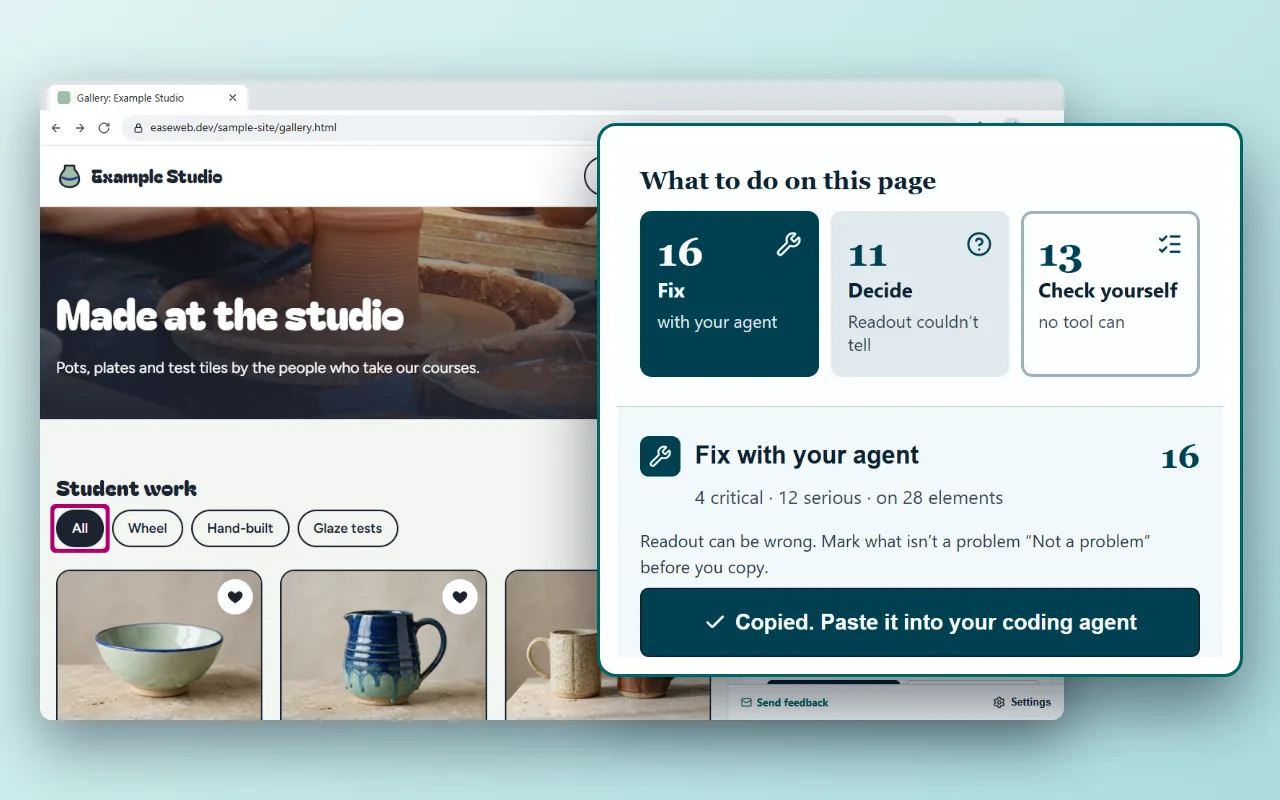
Fix
with your agent, or by hand
One click copies the fix prompt for every problem. To do it yourself: the fix, a guide with the code, and steps to confirm it worked.
-
Decide
what Readout couldn’t tell
Each one shows what the check saw and what to look for, so you mark it a problem or not.
-
Check yourself
what no tool can
Using the page with a screen reader, whether alt text says what each image tells: each listed with how to check it.
One page, four checkers
Same page. The others find 3, Readout finds 16.
A made-up gallery page built with common failures, each tool run once as it comes. Try your own checker on it
Problems found
- WAVE 3
- Lighthouse 3 score 89 of 100
- axe-core 3
- Readout 16
What is on the page, and who found it
All four read these in the code
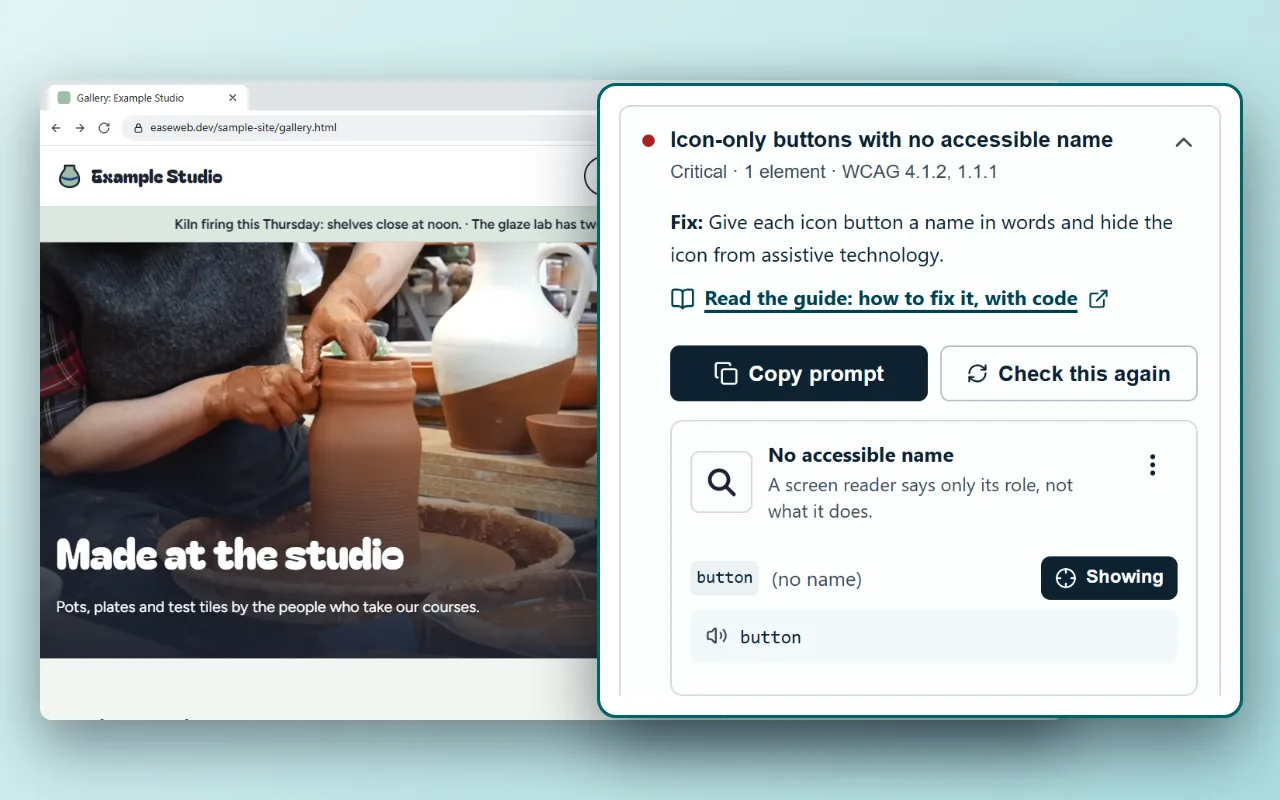
- The search button is an icon with no name
- The makers’ names are pale grey on white, 2.3:1
- The “Follow the studio” banner is a link with no name
All four
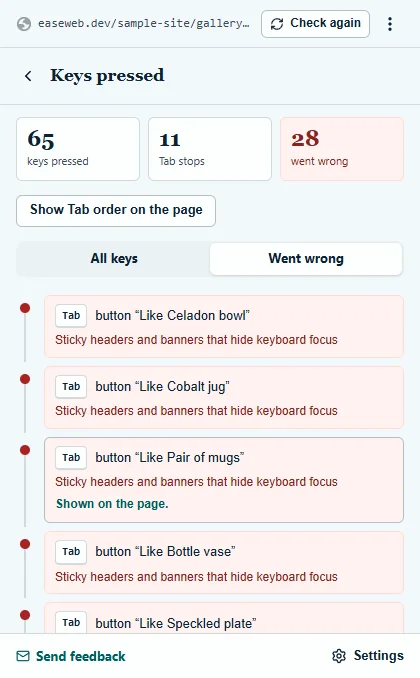
Readout presses Tab through the page
- The filters say they are buttons, but Tab never reaches them
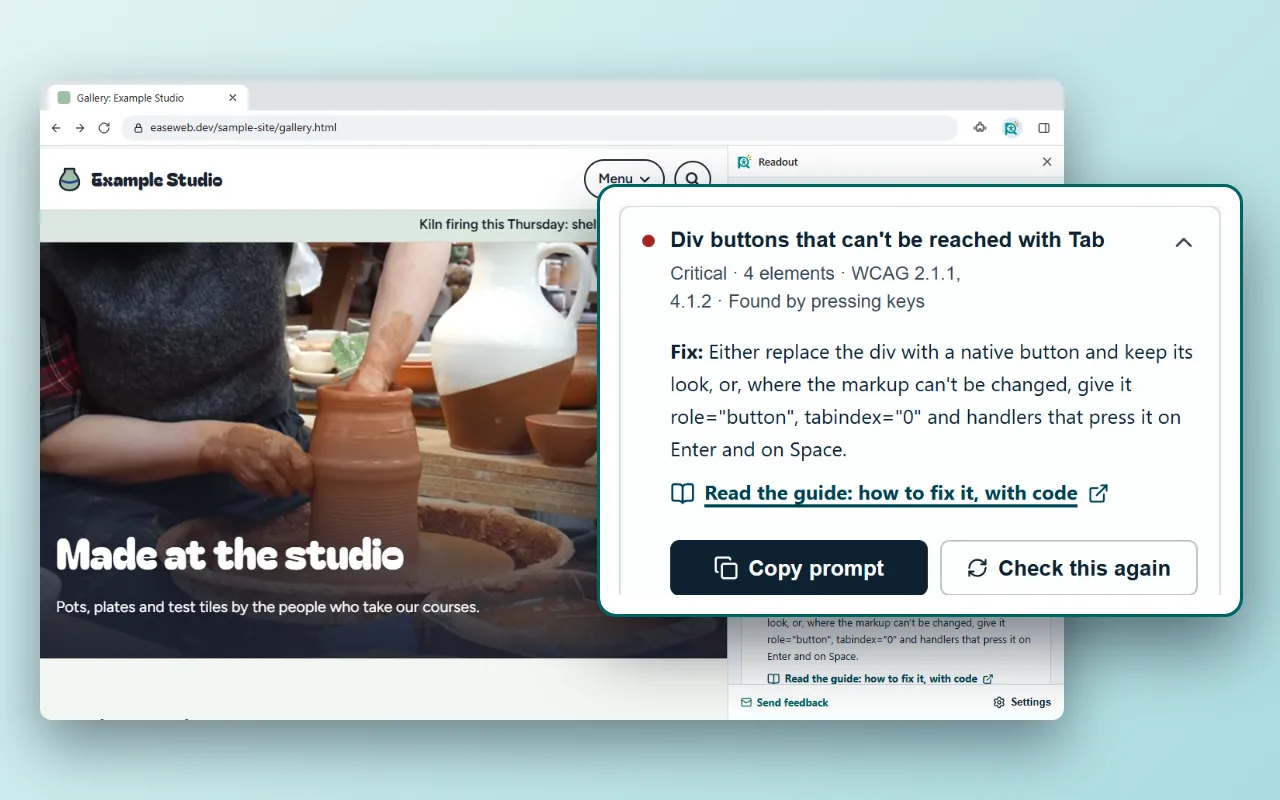
- The carousel’s arrows are divs Tab never reaches
- The recipe box keeps Tab, so the keyboard can’t leave it
- “Book a place” shows no change when it has focus
- Tab lands on Like buttons hidden behind the bar pinned to the bottom
Readout only
Readout opens each dialog
- The booking dialog opens with focus left on the page behind it
- The confirmation has no name, and its question isn’t read out
Readout only
Readout zooms in, enlarges the text and widens its spacing
- At 400% zoom, the booking dialog runs off the top and bottom of the window
- With wider text spacing, the letter button cuts off its label
Readout only
Readout watches what moves
- The wheel video loops with no pause button
- The news ticker scrolls by for ever
Readout only
Readout measures in forced colours and at the edges of fields
- In forced colours, the Like buttons lose their focus ring and their icons
- The email field’s edge is 1.3:1 against white
Readout only
Readout lists this under Decide, for you to look at
- With text at 200%, the events box and the letter button cut off their text
Readout: to decide
None of the four: a person finds these
- The Menu button is a div that Tab never reaches, and that doesn’t say it is a button
- At 400% zoom, the pinned bar covers the end of the page
None of the four
12 November 2026: WAVE in Chrome, Lighthouse 12.8.2, and axe-core 4.13.0, the engine in axe DevTools and Accessibility Insights; Readout’s test build on 15 November. What each left for a person (WAVE’s 5 alerts, what Readout put under Decide) isn’t counted.
Why Readout
What a free checker leaves to you.
-
Testing with the keyboard and zoom is on you.
Readout runs them on your page while you watch.
-
You can’t hear what a screen reader says.
Readout shows the predicted speech for each element.
-
The help explains the rule, not your code.
Copy prompt hands each problem to your coding agent.
-
After a fix, you compare by eye.
Check again sorts it into fixed, new and still there.
What it runs
11 runs, on the page you have open.
Any site you can open in Chrome, pages behind a login included.
-
Read page
axe-core and EaseWeb’s own rules: names, labels, contrast, and what axe leaves out.
-
Tab walk
Presses Tab: focus you can’t see or that hides, keyboard traps, controls Tab never reaches.
-
Menus, lists, sliders
Tries each widget’s own keys: arrow keys that do nothing.
-
Dialogs and tabs
Opens each dialog, menu and tab its button declares: focus that doesn’t go in or come back, Escape that doesn’t close.
-
What opens, phone width
Checks what dialogs, tabs and panels open, and the page at a phone’s width.
-
Form errors
Sends each form empty and with wrong values, stopped before anything leaves the browser, and reads the errors the page shows.
-
Flashing
Steps through animations and transitions, measuring flashing.
-
Narrow screen, large text
Narrows the window to 320 px, enlarges and spaces the text: content cut off, covered or gone.
-
Colour and contrast
Measures colours in the page’s own colours, in forced colours, as in a contrast theme, and in dark mode.
-
Hover
Rests the pointer on tips, menus and cards, and checks what they show.
-
Screen reader
Predicted speech for each stop, and where each name comes from.
From problem to code
Each problem ends in your code, then a check again.
It finds the problem
Grouped by the guide that explains it, with how serious it is and the WCAG criteria.
You see why
Each element on the page, what the check saw, and its predicted speech. “Show on page” points to it.
Your agent fixes it
The fix in one line and the guide. “Copy prompt” hands the problem and the page’s details to your coding agent.
You check again
What is no longer found, what is new and what is still there, each element with its predicted speech before and now.
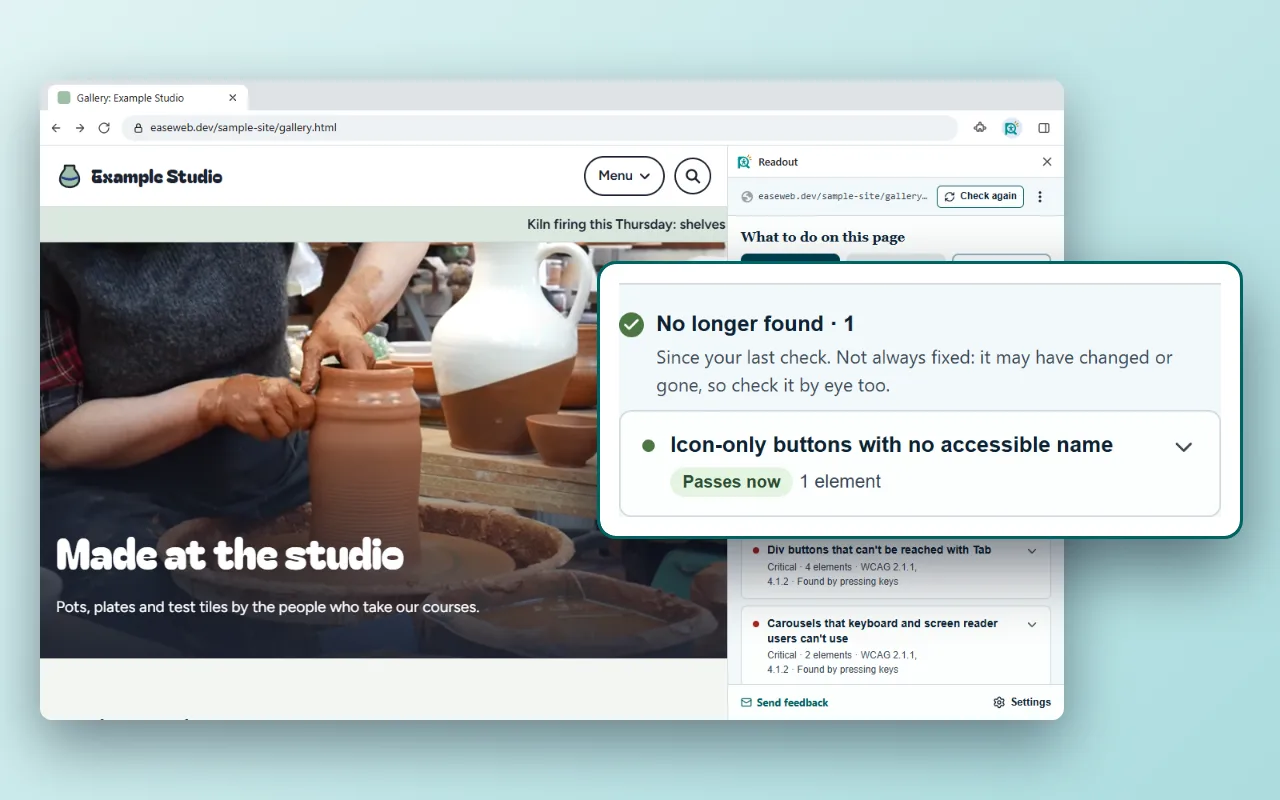


Works in any coding agent; with the free EaseWeb MCP server, it can open the whole guide itself. Add the MCP server
Side by side
Next to the free checkers you may use now.
Free versions, from each tool’s own documentation (12 November 2026).
| Readout | WAVE | axe DevTools | Lighthouse | Accessibility Insights | |
|---|---|---|---|---|---|
| Checks the page against rules | axe-core and EaseWeb’s own rules | Its own rules | axe-core | Part of axe-core | axe-core |
| Where the results show | A list in the side panel; “Show on page” outlines one element at a time | Icons placed over the page itself, by each element | A list in DevTools; it highlights one element at a time | A report in DevTools, listing the elements | A list, with a box on the page around every element it found |
| A guide to fixing each problem | EaseWeb guide: what goes wrong, the fixed code, how to test | Reference for each rule | Help page for each rule | Help page for each rule | How to fix, for each rule |
| Presses Tab and records where focus goes | By itself | No | Guided test, in paid Pro | No | You press Tab; it numbers each stop |
| Opens dialogs and menus, checks focus comes back | By itself, when the button says it opens one | No | Guided test, in paid Pro | No | Steps you follow, in Assessment |
| Narrow window, larger text, forced colours | By itself | No | No | No | Steps you follow, in Assessment |
| What a screen reader would say | Predicted, for each stop | The reading order | No | No | No |
| Hands each problem to your coding agent | Copy prompt, with the page’s details | No | MCP server, in a paid plan | No | No |
| Checks again and shows what changed | Fixed, new and still there | No | No | No | No |
| AI | Hints on your device, at no cost; not yet measured | No | AI features, in paid Pro | No | No |
| Price | Free | Free | Free version; Pro is paid | Free | Free |
Limits, up front
What it can’t do.
- No score and no “pass”. It lists what a person must still check.
- It can be wrong. A check may list something that isn’t a problem: mark it “Not a problem” and tell EaseWeb.
- Predicted speech comes from the code, not from NVDA, JAWS or VoiceOver.
- It opens only the dialogs and menus whose button says it opens one.
- Not yet: filling in forms with real answers, flashing in video, checks that need another page.
- AI hints aren’t measured yet, and never count as problems.
- It presses keys and reloads the page: save what you’ve typed first. Chrome only.
What it asks Chrome for
And why.
The tab you click it on
It reads a page only after you click its icon and choose Check this page.
The debugger
To press keys and resize the page, so Chrome warns it can “read and change all your data on all websites”. It attaches to one tab only while a check runs, with Chrome’s bar showing.
Nothing goes to EaseWeb
No account. Page content leaves your browser only when you copy a prompt, or with AI hints on and your own Google key: then the text it couldn’t decide and pictures of the page’s images go to Google.
When Readout has done its part
Readout ends with what a person must check. Send me that list with your pages, and I check it with a keyboard, screen readers and zoom, with a signed result for each item: from $149 a page or $400 a task.